Groong Podcast App, Now in Beta
Posted on Tuesday, Jun 9, 2026 | Category: Announcement | Series: Blog | Armenian News, Groong Podcast App, Groong Podcast, Groong, Podcast, Technology, Progressive Web App, Mobile App, Push Notifications, Armenian Diaspora, South Caucasus, BetaFor years, Groong has lived wherever our listeners find us: YouTube, podcast apps, social media, inboxes, group chats, and the occasional “Did you see this episode?” message from a friend.
That has worked well enough. Until it didn’t.
Like many independent media projects, we have found ourselves stuck in what we can only describe as recommender jail. We may have followers, subscribers, and people who want to hear from us, but the platforms often decide not to show our work to the very people who asked to see it.
So we built a small door out.
The Groong Podcast App is now in beta.
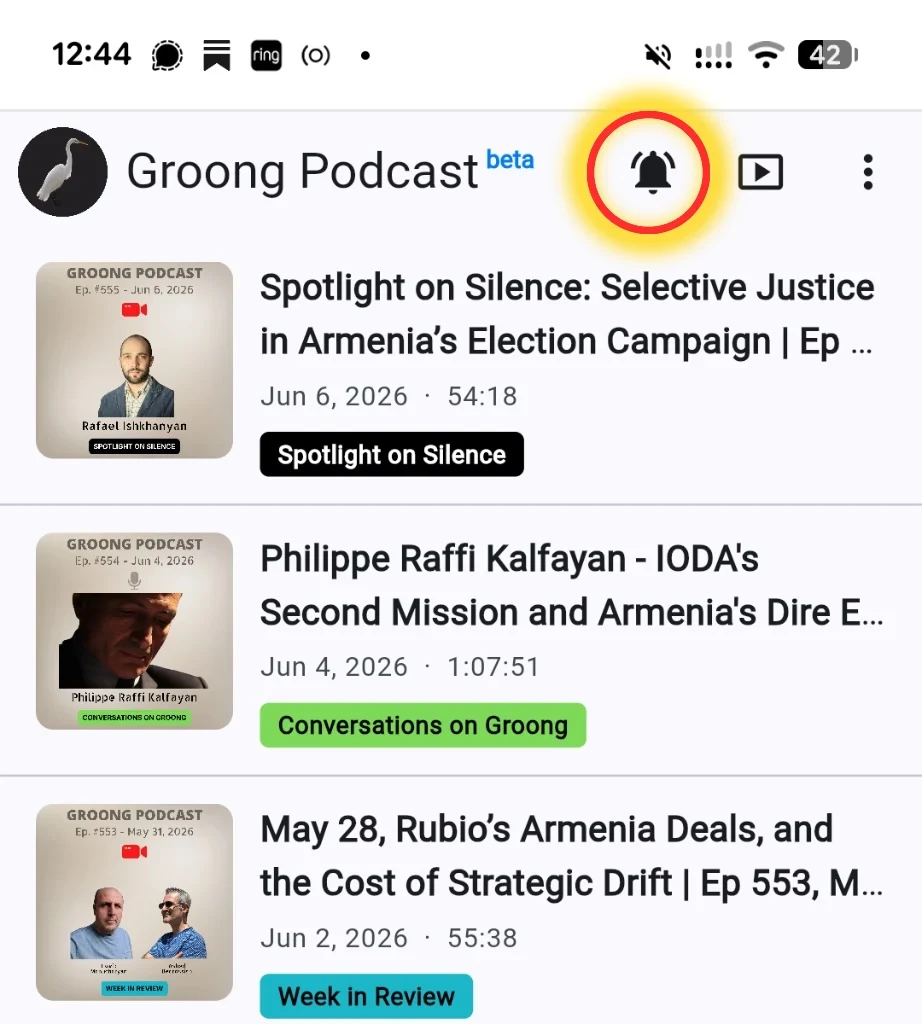
It is a dedicated home for Groong listeners, built to make it easier to follow our interviews, analysis, and conversations about Armenia, Artsakh , the Armenian diaspora , the South Caucasus , and the wider region.
Most of all, it lets us take notifications into our own hands.
Install the app. Tap the bell. Get notified when a new episode drops.
No algorithm. No mystery. No “we thought you would rather watch a 9-second cooking video instead.”
Why We Built It
Groong has now passed 555 episodes, with long-form conversations featuring analysts, authors, journalists, policymakers, scholars, and people who follow Armenia and the region with care.
But getting those episodes in front of our own audience has become harder.
YouTube does not always recommend us. Social platforms do not always show posts. Podcast apps are useful, but they are not always great for browsing a full archive. And if you miss an episode when it comes out, it can disappear into the feed before you know it.
This app is our answer to that problem.
It gives Groong a clean, focused, installable home. It keeps the full catalog in one place. It lets you watch or listen. And, with your permission, it can send you a notification when a new episode is published.
That last part matters.
We’re not trying to spam anyone. We’re trying to reach the people who already asked to hear from us.
What You Can Do in the Beta
This is a beta, which means there may be rough edges. But a lot is already working.
You can browse the full Groong catalog, newest episodes first. Each episode includes artwork, title, date, duration, and series tags. Pull to refresh, and the latest episode should appear.
You can watch or listen, depending on how you use Groong. Episodes open video-first with the YouTube player. With one tap, you can switch to audio mode, with play and pause, a scrubber, 15-second skip controls, and playback speed up to 2×.
For many episodes, you can also use chapter navigation. Tap a timestamped chapter and jump straight to that part of the discussion. For longer episodes, this should make it much easier to find the segment you care about.
Show notes are built in. They render inside the app, with safe working links. Guest information is also included, with guest photos where available. Tap a guest and you can read more on the Groong website.
The app also supports sharing and deep links. Every episode has its own link, so you can send a specific conversation to a friend and have it open right to that episode.
And yes, the app has light and dark themes, following your system settings.
The Bell Is the Point
The most important feature, at least for now, is the bell.
Once you install the app, tap the bell icon and allow notifications. After that, when a new Groong episode is published, you should get a notification. Tap it, and it opens the episode.
That is the whole idea.
We do not want to depend only on recommendation systems to reach our listeners. We do not want the platforms to quietly decide that Armenian news and analysis is not “engaging” enough today. We want a direct, simple path from new episode to listener.
The bell is that path.
It’s a Web App Today
The current beta is a Progressive Web App, or PWA.
That means you open it in your browser, install it to your home screen, and then it behaves much like a regular app. It has its own icon. It opens full-screen. It keeps the catalog cached on your device, so it can load fast and still show episodes when your connection is weak.
Installing takes only a few taps, and the steps differ by platform. On an iPhone or iPad, open app.groong.org in Safari, tap the Share button at the bottom of the screen, scroll down, and choose “Add to Home Screen.” On an Android phone or tablet, open app.groong.org in Chrome, tap the three-dot menu in the top right, and choose “Install app” or “Add to Home screen.” Either way, a Groong icon lands on your home screen, and from then on the app opens full-screen, just like any other app.
This is not yet a native iPhone or Android app from the app stores.
That is coming.
For now, the beta runs on the open web. This lets us ship faster, test with the community, fix what needs fixing, and avoid the app-store waiting room while we improve the experience.
Our plan is to use the same app foundation to bring native Android and iPhone versions next.
Privacy Matters
We built the app to be simple and privacy-respecting.
There are no accounts. No logins. No user profiles. No personal database hiding behind the curtain.
The app is mainly a fast reader and player for Groong’s public catalog.
Analytics are opt-in. On your first visit, you can accept or decline. If you decline, nothing is tracked. If you accept, we use basic privacy-conscious analytics to understand what people use, what breaks, and what we should improve. You can change your mind later from the menu.
Notifications do not carry personal information. The catalog is cached locally on your device.
Your attention belongs to the journalism, not to trackers.
What’s Coming Next
This beta is the first step.
On the roadmap are native iOS and Android apps, offline audio downloads, background and lock-screen playback, better browsing by series and topic, in-app search, richer guest pages, and weekly digests so you can catch up on what you missed.
We are not promising dates yet. We would rather ship carefully than make grand claims and then blame “supply chain issues” for an app.
But the direction is clear: one Groong app, everywhere, built around the way our listeners actually follow the show.
Try It and Tell Us What Breaks
This is where we need your help.
Open app.groong.org, install the beta, tap the bell, and test it.
Try watching an episode. Try switching to audio. Try chapters. Try sharing an episode. Try it on your phone, tablet, desktop, or whatever device you normally use while arguing with the news.
Then tell us what works and what does not.
Drop a comment under this announcement with your feedback, bug reports, feature requests, complaints, praise, or strange device behavior. “It works on my phone” is useful. “The bell does nothing on my browser” is also useful. “Please add search before I lose my mind” is very useful.
Groong has always been a community effort. The app should be, too.
So please test the beta, tap the bell, and help us make Groong easier to follow, easier to share, and harder for the platforms to bury.